Hello @hjiang
Thanks for your reply. I will wait for official upstreaming and keep an eye on your tracking progress.
Meanwhile, I have extended PR #7892 with this CPU affinity setting.
I was able to pin the desired CPU affinity successfully. For example, the following code means the model is only running on two big cores (and using core 6 and 7).

Following the same logic, and according to your previous answer,
I create two threads for two sub-graphs with setting 1st graph to LITTLE and 2nd graph to big. Here is the code:
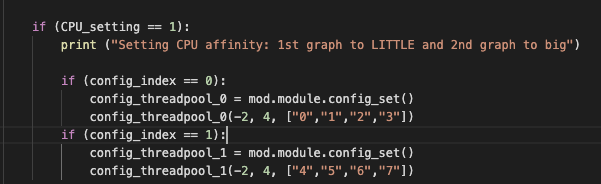
wherein, config_threadpool_0 is CPU affinity controller for subgraph_0 and config_threadpool_1 is CPU affinity controller for subgraph_1
However, I found out with this setting, if two thread_config is set, only the second one would be updated. In other words, the setting in the figure would make subgraph_1 running on 4 big cores, and subgraph_0 is not activated and running on default mode (which is 4 big cores).
As for another setting with 1st graph to big and 2nd graph to LITTLE,
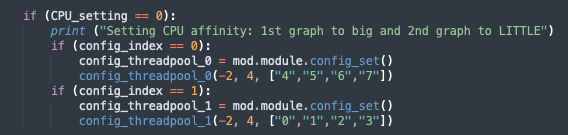
Here, subgraph_1 running on 4 small cores and subgraph_0 will run with default setting (which is 4 big cores). Although this second setting fulfills what I wanna do, the overall setting is somehow inflexible and hard to use.
May I ask do you have any comment on that or do you have a better way to create threads and set CPU affinity in python simulation?
Thanks.